
Download Windows Password Finder – Free, Secure, Fast Password Recovery Tool for Windows, Mac, and PC
Forgetting your Windows password can be a frustrating experience, especially when you need immediate access to your files, emails, or work projects. With Windows Password Finder, you can recover your lost or forgotten login credentials in just minutes. This powerful yet simple tool is designed for users of all skill levels and supports all major Windows versions, including Windows 10, Windows 11, and older systems like Windows 7 and 8.
Whether you're dealing with a standard user account or an administrator profile, this software ensures you regain access without data loss. The tool operates by creating a bootable CD or USB drive, allowing you to bypass the login screen and reset your password securely. No complex commands or technical knowledge required—just three straightforward steps.
Best of all, it’s a free solution that doesn’t require an internet connection after setup, making it ideal for offline environments. With detailed on-screen instructions and a clean, intuitive interface, Windows Password Finder is the most reliable password recovery tool available for Windows users.
How Windows Password Finder Works: A Step-by-Step Guide
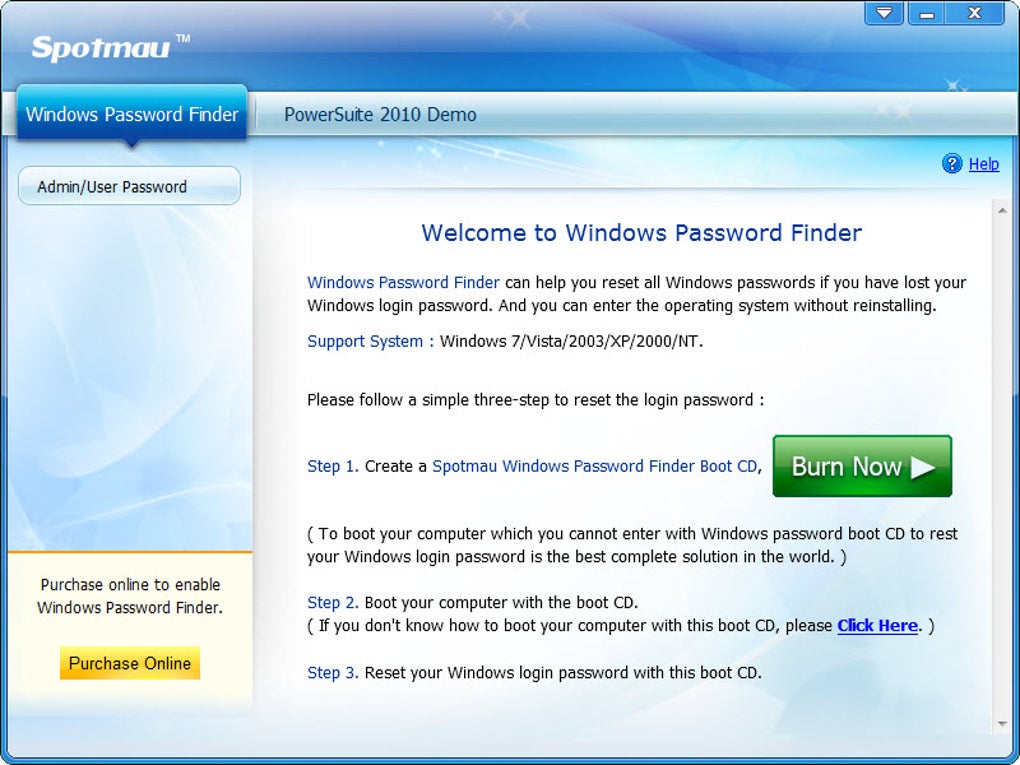
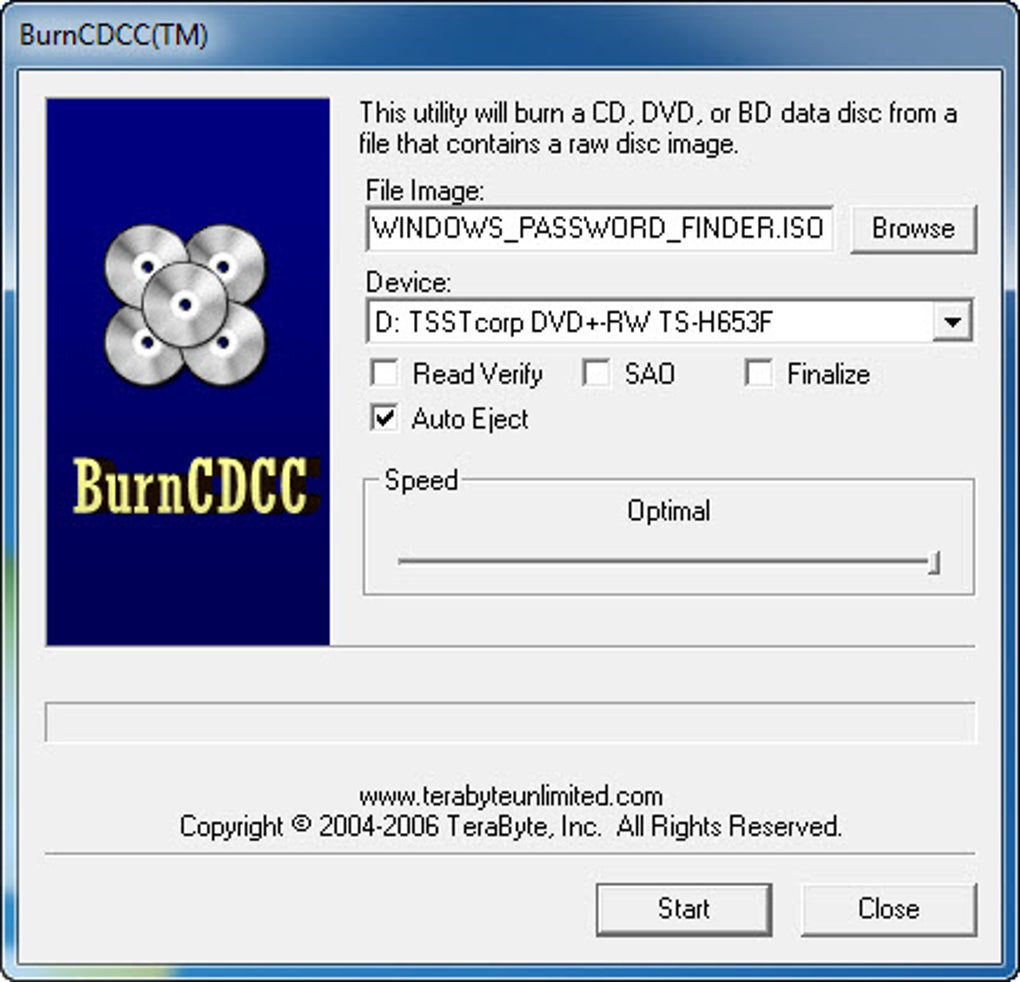
Recovering a forgotten Windows password shouldn’t be a complicated ordeal. Windows Password Finder simplifies the process into just three easy steps, making it accessible even for beginners. The first step involves downloading the software from the official website and using a separate computer to burn the provided ISO file onto a CD or USB drive.
This is a one-time process and requires no technical expertise—most modern PCs can handle this task with built-in burning tools. Once the bootable media is ready, you insert it into the locked computer and restart the machine. The second step is to boot from the CD or USB.
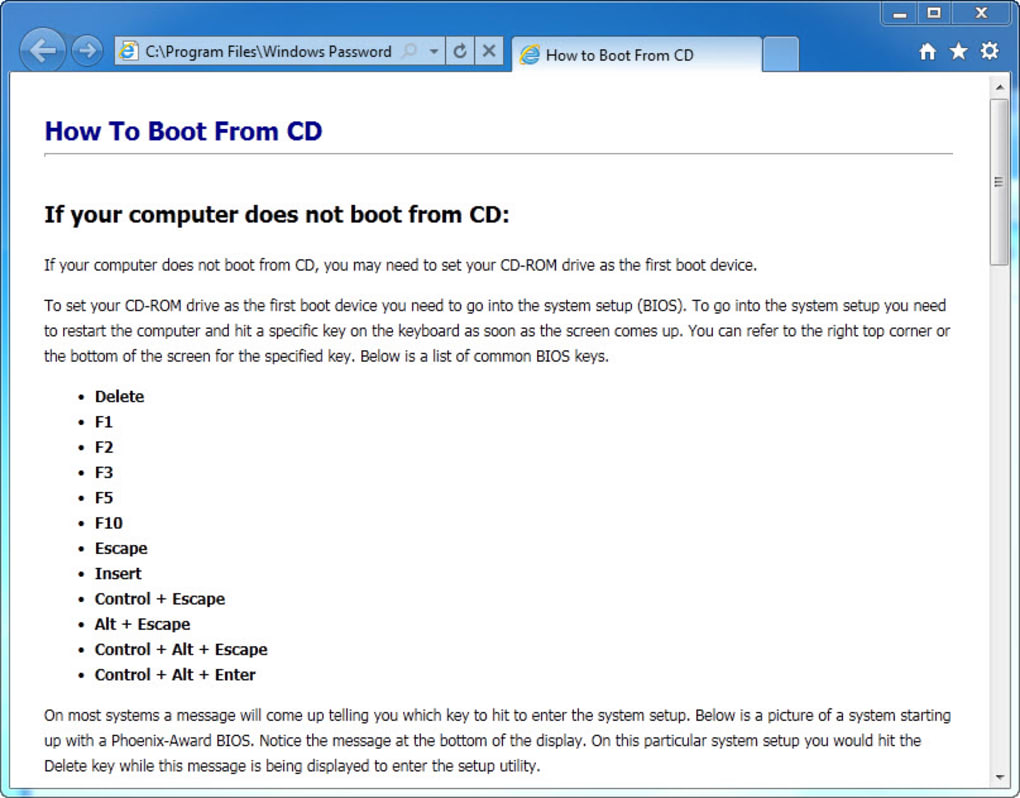
If you're unsure how to change the boot order in your BIOS, the software provides clear, step-by-step guides for different motherboard brands and models, ensuring you won’t get stuck. The third and final step is the actual password reset. Upon booting from the media, the tool launches a lightweight interface where you can select your user account and set a new password.
The entire process typically takes less than five minutes, and your system will be accessible again with full access to your files and settings.
One of the standout advantages of Windows Password Finder is its compatibility across a wide range of Windows versions. Whether you're using Windows 10 Home, Pro, Enterprise, or even legacy systems like Windows XP, the tool adapts seamlessly. It works on both 32-bit and 64-bit systems, and supports multiple user accounts, including those with administrator privileges.
Unlike some third-party tools that may fail on newer Windows updates, this software is regularly updated to maintain compatibility. The interface is minimalistic but highly functional—no clutter, no distractions—just a clean list of user accounts and a password reset field. Importantly, the tool does not alter or delete your data.
It only resets the password, ensuring your documents, photos, and applications remain untouched. This makes it a safe and trustworthy solution for users concerned about data integrity.
Key Features of Windows Password Finder – Why It Stands Out
When it comes to password recovery tools, Windows Password Finder offers a compelling mix of features that set it apart from competitors. First and foremost, it’s completely free to use, with no hidden fees or subscription models. This makes it an excellent choice for individuals and small businesses looking for a no-cost solution.
The software is also secure and offline-capable—once the bootable media is created, you don’t need an internet connection to recover your password, which enhances privacy and reduces the risk of data breaches. Another major feature is its universal compatibility. It supports all Windows operating systems, from Windows 7 to the latest Windows 11, and works on both desktops and laptops.
Whether you're using a Dell, HP, Lenovo, or any other brand, the tool adapts to your hardware setup.
The tool includes a built-in BIOS guide that walks users through changing the boot order, a common hurdle for first-time users. This feature alone saves hours of frustration and eliminates the need to search for external tutorials. Additionally, the interface is designed with usability in mind—simple navigation, large buttons, and clear instructions make it accessible even for non-technical users.
It supports multiple user accounts, so if you have several profiles on your system, you can reset any one of them individually. The software also doesn’t require installation on the target machine, which means it won’t leave behind any traces or registry entries. This is crucial for maintaining system integrity and avoiding potential conflicts.
Lastly, the tool is regularly updated to address new Windows security updates and hardware changes, ensuring long-term reliability. For anyone who’s ever been locked out of their PC, Windows Password Finder delivers peace of mind with every use.
- Free to download and use – No cost, no hidden fees
- Supports all Windows versions – From Windows 7 to Windows 11
- Works on all user accounts – Standard and Administrator profiles
- Bootable CD/USB creation – Easy to create with any PC
- Offline operation – No internet needed after setup
- Safe and non-destructive – Preserves all your data
- Comprehensive BIOS guide – Step-by-step boot instructions
- Regular updates – Maintains compatibility with new systems
Compatibility & Installation: Getting Started on Any Device
One of the most common concerns users have is whether a password recovery tool will work on their specific device. Windows Password Finder excels in this area, offering broad compatibility across different platforms. It supports Windows 7, Windows 8, Windows 8.1, Windows 10, and Windows 11, covering nearly all modern and legacy systems.
Whether you're using a desktop, laptop, or even a refurbished PC, this tool is designed to work regardless of hardware configuration. The software itself is available for both Windows and Mac operating systems, allowing you to create the bootable media from either platform. This flexibility is a major advantage, especially if your locked computer doesn’t have a working CD/DVD drive or USB port.
Installation is straightforward but not on the target machine. Instead, you download the software on a working computer—either Windows or Mac—and use it to generate the bootable ISO file. From there, you can burn it to a CD using standard burning software or write it to a USB drive using tools like Rufus or Disk Utility.
The process takes less than 10 minutes and requires no special skills. Once the bootable media is ready, you insert it into the locked PC, restart, and follow the on-screen prompts. The tool automatically detects your Windows installation and lists all available user accounts.
You can then select the account you want to reset and enter a new password. There’s no need to remember old passwords or go through complex recovery processes. The entire experience is seamless, fast, and secure.
For users who prefer mobile access, while the tool isn’t available as an app for Android or iOS, the bootable media can be created from any device with internet access, making it a truly cross-platform solution.
Pros and Cons: A Balanced View of Windows Password Finder
Like any software, Windows Password Finder has its strengths and limitations. Here’s a balanced look at what users can expect.
Pros:
- Free and reliable – No cost, no ads, no hidden charges
- Works on all Windows versions – From Windows 7 to Windows 11
- Safe data recovery – Password reset without deleting files
- Simple interface – Easy to use, even for beginners
- Includes BIOS guide – Helps with boot order changes
- Regular updates – Keeps up with new Windows security features
Cons:
- Requires another PC – You need a working computer to create the bootable media
- Not available as mobile app – No Android or iOS version
- No password recovery – Only resets passwords, doesn’t retrieve old ones
Frequently Asked Questions (FAQ)
Can I use Windows Password Finder on Windows 11?
Yes, Windows Password Finder fully supports Windows 11. It’s regularly updated to ensure compatibility with the latest security patches and system updates.
Do I need an internet connection to use the tool?
No, once the bootable media is created, you don’t need an internet connection. The tool runs entirely offline, enhancing security and privacy.
Will resetting my password delete my files?
No, the tool only resets the password. Your personal files, documents, and applications remain completely intact and accessible.
Can I reset the password of an administrator account?
Yes, Windows Password Finder works on all user accounts, including those with administrator privileges.
Is it safe to use on my personal computer?
Yes, the tool is secure, non-destructive, and doesn’t install anything on your system. It’s designed to be used temporarily and then discarded.
Conclusion: The Best Free Solution for Forgotten Windows Passwords
If you’ve ever been locked out of your Windows PC due to a forgotten password, Windows Password Finder is the most effective and trustworthy solution available. With its simple three-step process, broad compatibility, and commitment to data safety, it stands out as a top choice among password recovery tools. Whether you're a student, professional, or home user, this software offers a fast, secure, and free way to regain access to your system.
The fact that it works on all major Windows versions and supports both standard and admin accounts makes it incredibly versatile. While it does require another computer to create the bootable media, this small inconvenience is far outweighed by the benefits. For anyone seeking a reliable, no-cost tool to recover their Windows login, Download Windows Password Finder today and take back control of your PC.







